

[Feb-2026] SAP C-THR81-2505 Dumps – Reduce Your Chance of Failure in C-THR81-2505 Exam
To help you achieve your ultimate goal, we suggest the actual SAP C-THR81-2505 dumps for your SAP Certified Associate - SAP SuccessFactors Employee Central Core exam preparation to use as your guideline.
NEW QUESTION # 11
Your client is live with the employee transfer process in the production instance. The workflow shown in the screenshot is triggered when an employee transfer is initiated.
What is the expected behavior of this workflow?
- A. The initiator of the employee transfer process is given an option to choose New Hire Workflow as an alternate workflow to WF_Employee_Transfer.
- B. If an approver does NOT take any action for 3 days, a reminder notification is sent by the system.
- C. An approver can automatically reroute this request to another employee during vacation.
- D. The alternate workflow is used when there is a future-dated record entered for the employee.
Answer: D
Explanation:
In the scenario where an employee transfer process is initiated, and a workflow is triggered, the system behavior is as follows:
Alternate Workflow Usage: If there is a future-dated record entered for the employee, the system utilizes the alternate workflow. This mechanism ensures that the appropriate workflow is applied based on the effective date of the transaction, allowing for accurate processing of future-dated changes.
This functionality is designed to handle scenarios where actions need to be taken in advance, ensuring that the system processes the correct workflow when the future-dated record becomes effective.
NEW QUESTION # 12
A customer has scheduled an HRIS sync job, which includes mapping of job titles, to run every Friday. On Tuesday, an employee's job title is changed via Manager Self-Service (MSS) to become effective on Thursday.
When will the synchronization happen?
- A. Saturday, the day after the sync job completes
- B. Tuesday, the day the transaction is entered
- C. Thursday, when the change becomes effective
- D. Friday, when the sync job completes
Answer: D
Explanation:
In SAP SuccessFactors Employee Central, the HRIS synchronization (sync) job is responsible for aligning data between different modules and ensuring consistency across the system. When an employee's job title is changed via Manager Self-Service (MSS) with an effective date set to Thursday, and the HRIS sync job is scheduled to run every Friday, the synchronization will occur on Friday, when the sync job completes.
This means that any changes made effective on Thursday will be synchronized during the next scheduled HRIS sync job on Friday. Therefore, the correct answer is C. Friday, when the sync job completes.
NEW QUESTION # 13
Which permission controls a user's access to the Edit button in the history of Job Information?
- A. Edit Link > Edit/Insert
- B. Job Information Actions > View History
- C. Job Information Actions > Edit/Insert
- D. Job Information Actions > Correct
Answer: D
Explanation:
Job Information Actions > Correct permission controls the Edit button in the Job Information history.
This permission allows users to correct existing records without creating a new effective-dated record. It ensures that only authorized users can make retroactive changes to historical data.
Other permissions, such as Edit Link > Edit/Insert, Job Information Actions > Edit/Insert, or Job Information Actions > View History, do not directly control access to the Edit button in the history section.
NEW QUESTION # 14
Which HRIS elements share the same People Profile block? Note: There are 2 correct answers to this question.
- A. jobinfo and organizationInfo
- B. personInfo and globalinfo
- C. compInfo and payComponentRecurring
- D. personalinfo and globalinfo
Answer: C,D
Explanation:
In SAP SuccessFactors Employee Central, the People Profile is designed to consolidate related HRIS elements into cohesive blocks for streamlined data management. Specifically, the compInfo (Compensation Information) and payComponentRecurring (Recurring Pay Components) HRIS elements share the same People Profile block. Similarly, the personalinfo (Personal Information) and globalinfo (Global Information) HRIS elements are grouped together within the People Profile. This structured grouping enhances the user experience by providing a unified view of related employee information.
NEW QUESTION # 15
What are some of the position management application-specific rule scenarios? Note: There are 3 correct answers to this question.
- A. Derive Job Requisition Template in Recruiting Integration
- B. Update Rule for Mass Change Run
- C. Trigger Rules to Calculate Full-Time Equivalent
- D. Trigger Rules for Off Cycle Event Batch
- E. Create Right to Return for Incumbent
Answer: B,C,E
Explanation:
Application-specific rule scenarios in Position Management include:
A . Create Right to Return for Incumbent:
This rule supports the creation of a right-to-return record for an incumbent when a position-related action occurs, such as a temporary assignment.
B . Update Rule for Mass Change Run:
This rule automates updates during mass position changes, ensuring consistent application of business logic across multiple positions.
C . Trigger Rules to Calculate Full-Time Equivalent:
This rule calculates the FTE value based on position or job information attributes, ensuring accurate reporting and compliance.
These rules enhance the flexibility and functionality of position management processes.
NEW QUESTION # 16
Your client is live with the employee transfer process in the production instance. The workflow shown in the screenshot is triggered when an employee transfer is initiated.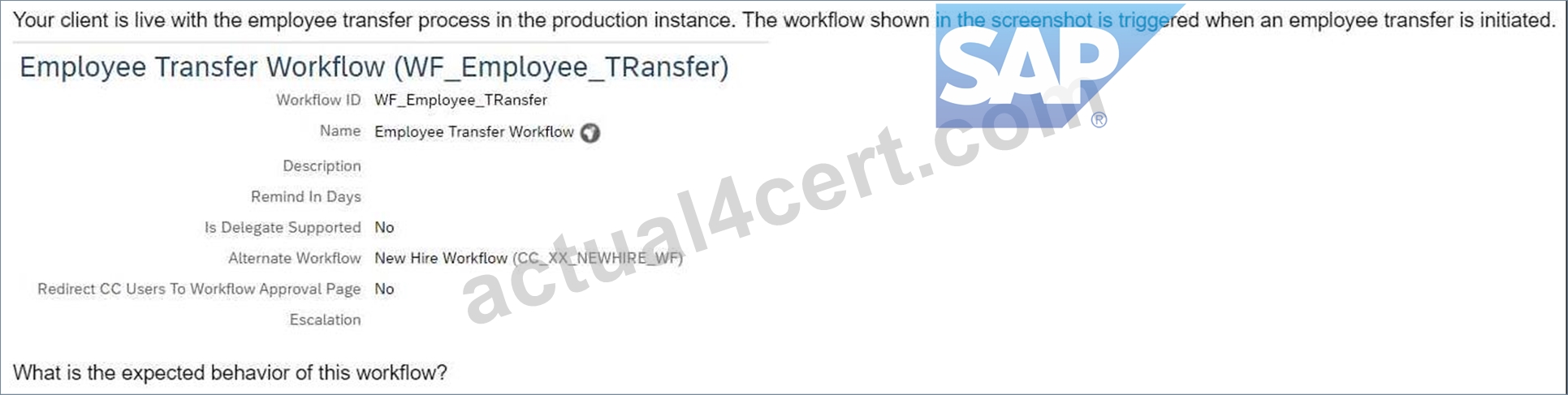
What is the expected behavior of this workflow?
- A. The initiator of the employee transfer process is given an option to choose New Hire Workflow as an alternate workflow to WF_Employee_Transfer.
- B. If an approver does NOT take any action for 3 days, a reminder notification is sent by the system.
- C. An approver can automatically reroute this request to another employee during vacation.
- D. The alternate workflow is used when there is a future-dated record entered for the employee.
Answer: D
Explanation:
In the scenario where an employee transfer process is initiated, and a workflow is triggered, the system behavior is as follows:
Alternate Workflow Usage: If there is a future-dated record entered for the employee, the system utilizes the alternate workflow. This mechanism ensures that the appropriate workflow is applied based on the effective date of the transaction, allowing for accurate processing of future-dated changes.
This functionality is designed to handle scenarios where actions need to be taken in advance, ensuring that the system processes the correct workflow when the future-dated record becomes effective.
NEW QUESTION # 17
How are business rules handled in Employee Central Quick Actions?
- A. The system supports all onSave rules.
- B. The system does NOT support onPostSave rules.
- C. onView rules are supported when the fields are included in the template.
- D. onChange rules are supported when the fields are included in the template.
Answer: C,D
NEW QUESTION # 18
An employee will be changing their nationality information on their own How do you build the IF condition in the business rule so they can do this?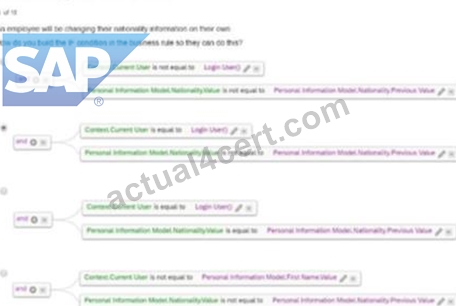
- A. Option B
- B. Option A
- C. Option C
- D. Option D
Answer: A
Explanation:
In order for an employee to change their nationality information on their own, the IF condition must:
Validate that the Context.Current User is equal to Login User (ensures that the logged-in user is making the changes).
Check if the Nationality.Value is not equal to the Nationality.Previous Value (ensures that a change is being made).
Scenario 2: Approvals for Self-Service
NEW QUESTION # 19
A business rule triggers a transfer event reason when an employee's location is changed. Which base object would you use for this business rule?
- A. Job Information
- B. Job Information Model
- C. Employee Information Model
- D. Employee Information
Answer: B
Explanation:
When creating a business rule to trigger a transfer event reason upon a location change, the Job Information Model is the correct base object. This is because location is a field within the Job Information entity, and changes to fields within this entity are best handled using the Job Information Model base object for related rules.
Correct answer:
C: Job Information Model
NEW QUESTION # 20
How do you set the event date in Compensation Information for the jobinfo_FTE_Comp cross-entity rule?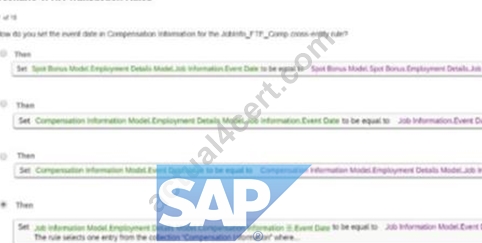
- A. Option A
- B. Option D
- C. Option C
- D. Option B
Answer: B
Explanation:
To set the event date in Compensation Information for the Jobinfo_FTE_Comp cross-entity rule, Option D is the correct method. The approach ensures that the Event Date field in the Compensation Information section aligns with the Event Date in Job Information. This synchronization is crucial for maintaining consistency in effective dates across entities during HR transactions.
Scenario 1: HR Transaction Rules
NEW QUESTION # 21
Which of the following are possible options when working with SAP SuccessFactors Employee Central employee identifiers? Note: There are 3 correct answers to this question.
- A. A user can have multiple user ids.
- B. Once generated, you CANNOT change a person id external.
- C. A user can have only one user id.
- D. A user can have only one person id external.
- E. Once generated, you CANNOT change a user id.
Answer: A,D,E
Explanation:
In SAP SuccessFactors Employee Central, employee identifiers are managed as follows:
A . Once generated, you CANNOT change a user id.
The User ID serves as a unique identifier for an employee's employment record. Once assigned, it cannot be altered.
D . A user can have multiple user ids.
An employee may possess multiple User IDs, especially in scenarios involving concurrent employment or global assignments. Each employment instance is associated with a distinct User ID.
E . A user can have only one person id external.
The Person ID External uniquely identifies an individual across all employment records within the system. An employee is assigned a single Person ID External, regardless of the number of employments.
Options B and C are incorrect:
B . A user can have only one user id.
This is incorrect because, as mentioned, an employee can have multiple User IDs corresponding to different employment instances.
C . Once generated, you CANNOT change a person id external.
This is incorrect. While the Person ID External is intended to be a stable identifier, it can be changed if necessary, though such changes should be managed carefully to maintain data integrity.
NEW QUESTION # 22
In which section in the Manage Permission Roles tool do you set Biographical Information?
- A. Employee Central Effective Dated Entities
- B. Employee Data
- C. Employee View
- D. Manage User
Answer: B
Explanation:
The Biographical Information permissions are managed in the Employee Data section of the Manage Permission Roles tool.
This section governs access to basic employee details, including biographical information such as name, date of birth, and personal identifiers.
Configuring permissions here ensures that the appropriate user roles can view or edit biographical details while maintaining data security and compliance.
NEW QUESTION # 23
Manager A initiated a job code change for Employee X with an effectivity date of January 15. Another manager initiated the same request, but for January 30. What happens to the workflows triggered by both transactions?
- A. The system will cancel the second workflow.
- B. The system will allow both workflows to continue.
- C. The system will cancel the first workflow.
- D. The system will reject both workflows.
Answer: B
Explanation:
When two workflows are initiated for the same employee with different effective dates, both workflows are allowed to proceed independently. The system processes them sequentially based on their respective effective dates. This ensures that updates are recorded in the order they occur without rejecting either workflow.
Other options, such as canceling or rejecting workflows, do not align with standard system behavior for managing multiple transactions.
NEW QUESTION # 24
How do you trigger a business rule to populate the Standard Hours field from Legal Entity records in the Add New Employee wizard?
- A. Event Type: onSave: Base Object: Legal Entity
- B. Event Type: onEdit; Base Object: Employee Information
- C. Event Type: onChange; Base Object: Employee Information
- D. Event Type: onInit; Base Object: Standard Hours
Answer: D
Explanation:
To populate the Standard Hours field from Legal Entity records in the Add New Employee wizard, the business rule should be configured with:
Event Type: onInit
This event triggers the rule during the initialization phase of the Add New Employee wizard.
Base Object: Standard Hours
The rule applies to the Standard Hours field, pulling data from the Legal Entity record.
Other event types such as onChange, onEdit, or onSave are not appropriate for pre-populating fields during the Add New Employee process.
NEW QUESTION # 25
You need to create a one-to-many association from Location to Legal Entity. You also need to configure filtering of the Location field based on the Company field in the Job Information block.
What do you need to add to the data models? Note: There are 2 correct answers to this question.
- A. <field-criteria> as part of <hris-field="location">
- B. <association> as part of <hris-element id="jobInfo">
- C. <field-criteria> as part of <hris-field="company">
- D. <association> as part of <hris-element id="location">
Answer: A,D
Explanation:
To establish a one-to-many association from Location to Legal Entity and enable filtering of the Location field based on the Company field in the Job Information block, the following configurations are necessary:
Define the Association in the Location Object:
In the location object definition, add an <association> element to link it to the legalEntity object. This association should be defined within the <hris-element id="location"> section.
Configure Field Criteria for the Location Field:
Within the Job Information (jobInfo) element, add a <field-criteria> element as part of the <hris-field id="location">. This configuration ensures that the Location field is filtered based on the selected Company (Legal Entity) in the Job Information block.
Therefore, the correct answers are:
B: <field-criteria> as part of <hris-field id="location">
D: <association> as part of <hris-element id="location">
These configurations align with the standard practices for setting up associations and field criteria in SAP SuccessFactors Employee Central.
NEW QUESTION # 26
Which events are NOT supported by event reason derivation? Note: There are 2 correct answers to this question.
- A. Hire
- B. Transfer
- C. Data change
- D. Termination
Answer: A,D
Explanation:
Event reason derivation in Employee Central does not support certain predefined events such as:
Termination: This event is typically manually configured without automatic derivation of event reasons.
Hire: Similarly, for the hire process, event reasons are explicitly selected rather than being derived automatically.
Other events like Transfer and Data Change are supported for event reason derivation, as they rely on changes in job information or other key attributes.
NEW QUESTION # 27
This is a global customer and HR admins will be assigned based on legal entity. The HR admins should be getting approval workflows from their target population.
How can you define this in one workflow?
- A. Create a dynamic role using the Legal Entity filter and assign the Resolver type as dynamic group
- B. Create permission groups for each legal entity and assign them to the HR admin role.
- C. Create a dynamic role for each legal entity and assign the Resolver as the head of the legal entity.
- D. Create dynamic groups per each legal entity and add the necessary approver steps.
Answer: A
Explanation:
For a global customer where HR admins are assigned based on legal entities and need to receive approval workflows for their target population, you can configure the workflow as follows:
* Create a Dynamic Role using the Legal Entity filter.
* Assign the Resolver Type as a Dynamic Group to ensure the workflow automatically routes to the correct HR admin based on the legal entity.This configuration avoids creating multiple static workflows and simplifies management by dynamically resolving approvers based on the legal entity.
Scenario 2: Approvals for Self-Service
NEW QUESTION # 28
Where do you enable the Incumbent of Parent Position option to filter positions in Hire, MSS Job Information and History?
- A. In Configure Object Definitions > Position
- B. In Position Management Settings > UI Customizing
- C. In Manage Business Configuration > jobInfo
- D. In Position Management Settings > Hierarchy Adaptation
Answer: B
Explanation:
The Incumbent of Parent Position option, used to filter positions in Hire, MSS Job Information, and History, is enabled in Position Management Settings > UI Customizing. This configuration allows users to define filtering options for selecting positions, improving usability and ensuring data relevance during employee management processes.
NEW QUESTION # 29
Which objects are supported in cross-entity business rules? Note: There are 2 correct answers to this question.
- A. Job Information
- B. Pay Component Recurring
- C. Work Permit Information
- D. Personal Information
Answer: A,B
Explanation:
Cross-entity business rules in SAP SuccessFactors Employee Central allow for data propagation and validation across different HRIS elements. The following objects are supported in cross-entity business rules:
A . Pay Component Recurring
This object pertains to regular, recurring payments such as salaries. Cross-entity rules can be configured to update or validate data between Pay Component Recurring and other entities like Job Information.
D . Job Information
This object contains details about an employee's job role, department, and other related information. Cross-entity rules can be used to ensure consistency between Job Information and other entities, such as Compensation Information.
Objects like Work Permit Information and Personal Information are not currently supported in cross-entity business rules. The focus of cross-entity rules is primarily on employment-related entities to maintain data integrity across core HR processes.
NEW QUESTION # 30
In which section in the Manage Permission Roles tool do you set Biographical Information?
- A. Employee Central Effective Dated Entities
- B. Employee Data
- C. Employee View
- D. Manage User
Answer: B
Explanation:
The Biographical Information permissions are managed in the Employee Data section of the Manage Permission Roles tool.
* This section governs access to basic employee details, including biographical information such as name, date of birth, and personal identifiers.
* Configuring permissions here ensures that the appropriate user roles can view or edit biographical details while maintaining data security and compliance.
NEW QUESTION # 31
Which rule supports the Default_JobClass requirement?
- A. Option B
- B. Option A
- C. Option C
- D. Option D
Answer: A
Explanation:
The rule in Option B supports the Default_JobClass requirement by setting default values for fields such as Job Title, Pay Grade, and Employee Class when the Job Classification field is NULL. This ensures that appropriate default data is applied to job information records when certain fields are not explicitly filled.
Scenario 1: HR Transaction Rules
NEW QUESTION # 32
......
100% Free C-THR81-2505 Demo-Trial [Pdf], get it now: https://drive.google.com/open?id=1wyuTgKdahLHUg2Y-TG4ISMkye05GDDpN
Accurate & Verified Answers As Seen in the Real Exam here: https://www.actual4cert.com/C-THR81-2505-real-questions.html